Hosted-search research with retained citations
Stories are found by hosted web search over your city and region. The native citations and provenance for each story are kept with it, not summarized away.
For independent newsrooms, local journalists and creators
Local Desk turns your city or region into a finished video edition every day: sourced research with citations you can show, a two-pass verification, your editorial approval on the exact copy, automated QA on the final file, and publishing to every platform with copy fitted to each one.
Pay as you go from $0.15 per finished second · no contract · cancel anytime
State of the art
Each stage is built to be checked. Nothing moves forward on an assumption, and every step leaves a record you can open.
Stories are found by hosted web search over your city and region. The native citations and provenance for each story are kept with it, not summarized away.
An independent pass checks each story's facts, dates and local relevance against your configured geography, radius and source restrictions. Native citations are retained; optional geocoding and extra text retrieval enrich the evidence without vetoing an otherwise verified story when unavailable.
You approve or reject the storyboard. Approval is tied to that exact copy version; if the copy changes, the approval no longer applies.
The finished video is transcribed and its frames are decoded and checked before publishing, so what ships is what was approved.
Post copy is fitted to each destination's limits and conventions. Every edition gets a public page listing each story and its sources.
Captions are timed to the word, burned in for silent autoplay, and exported as VTT and SRT sidecar files.
Optionally present each edition with a fictional AI avatar. The AI nature of the narration and presenter is disclosed on screen and on the edition page. Presenter editions use two credits per finished second.
Review outcomes feed a calibration report and an exportable evaluation set, so you can see how the desk's judgement tracks yours over time.
Every run shows what it cost in credits, stage by stage. No pooled minutes, no surprise overages.
See how editions perform by platform, by publishing hour and by the mix of stories they carried.
Live verified desks
Pick a city to inspect real stories verified and published by Local Desk — complete with verbatim source quotes, independent RFC 3161 timestamps, and C2PA content credentials when signing succeeds.
Browse the full directory at Verified local bulletins or search the Verified Local News Archive.
Why we're different
Every story starts from a real, cited source and keeps that source through production and onto the public edition page.
When verification, approval or QA cannot pass, the edition stops. It does not publish a best guess.
Your approval on the exact copy is the gate. The desk produces; you remain the publisher of record.
If no verified local stories remain, there is no edition. One verified story is enough, and news-only or events-only editions can proceed. We never pad a bulletin to fill a category.
Every published edition carries an evidence passport: verified stories with retained sources, quality verdicts, the delivery record and the audit trail, sealed with a hash anyone can check — on the public edition page, no login required.
Inside the desk
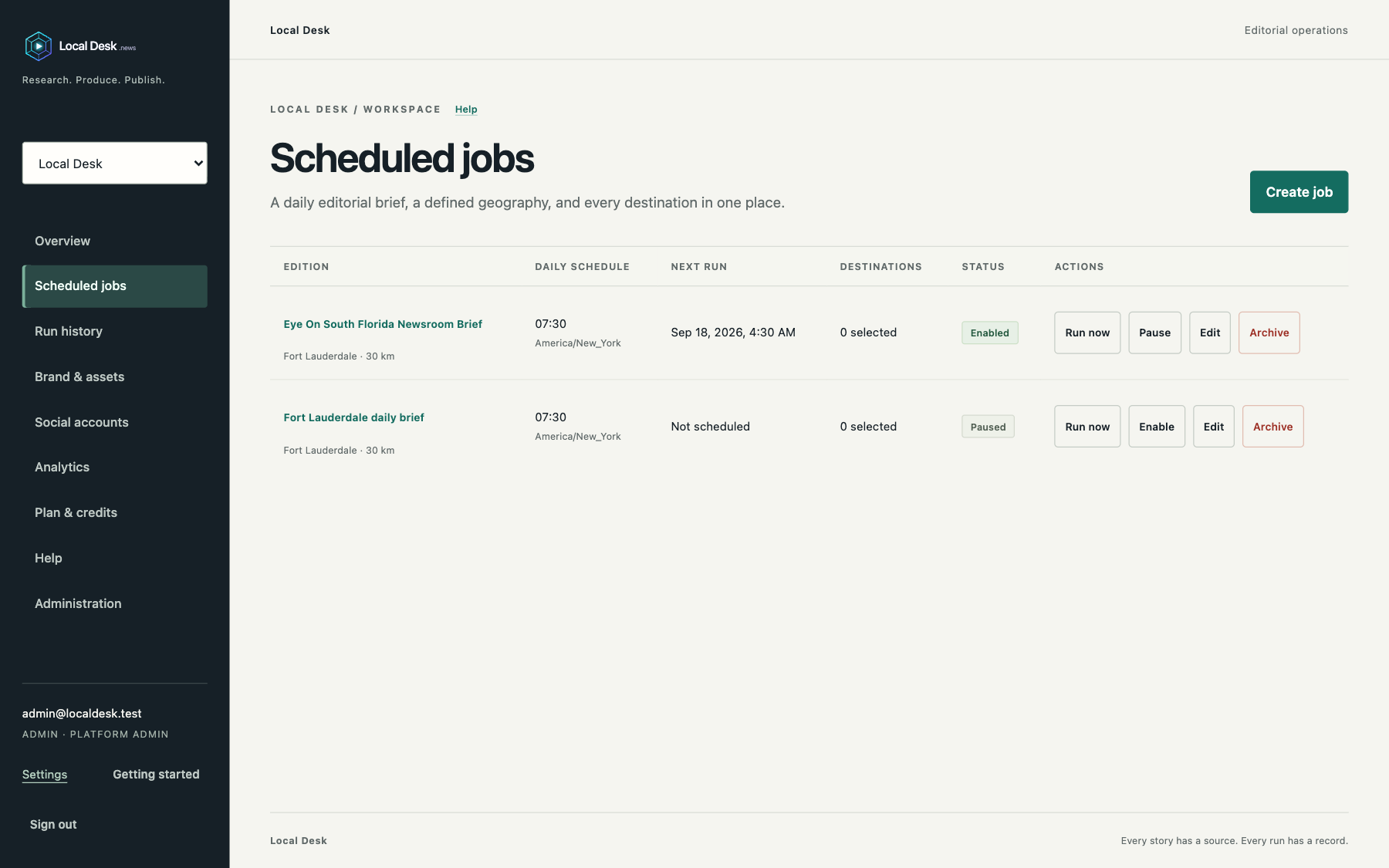
The research panel keeps each story's publisher and place, distance from your desk when coordinates are known, the retained evidence behind its date and location, and the candidates it rejected. Nothing is summarized away.
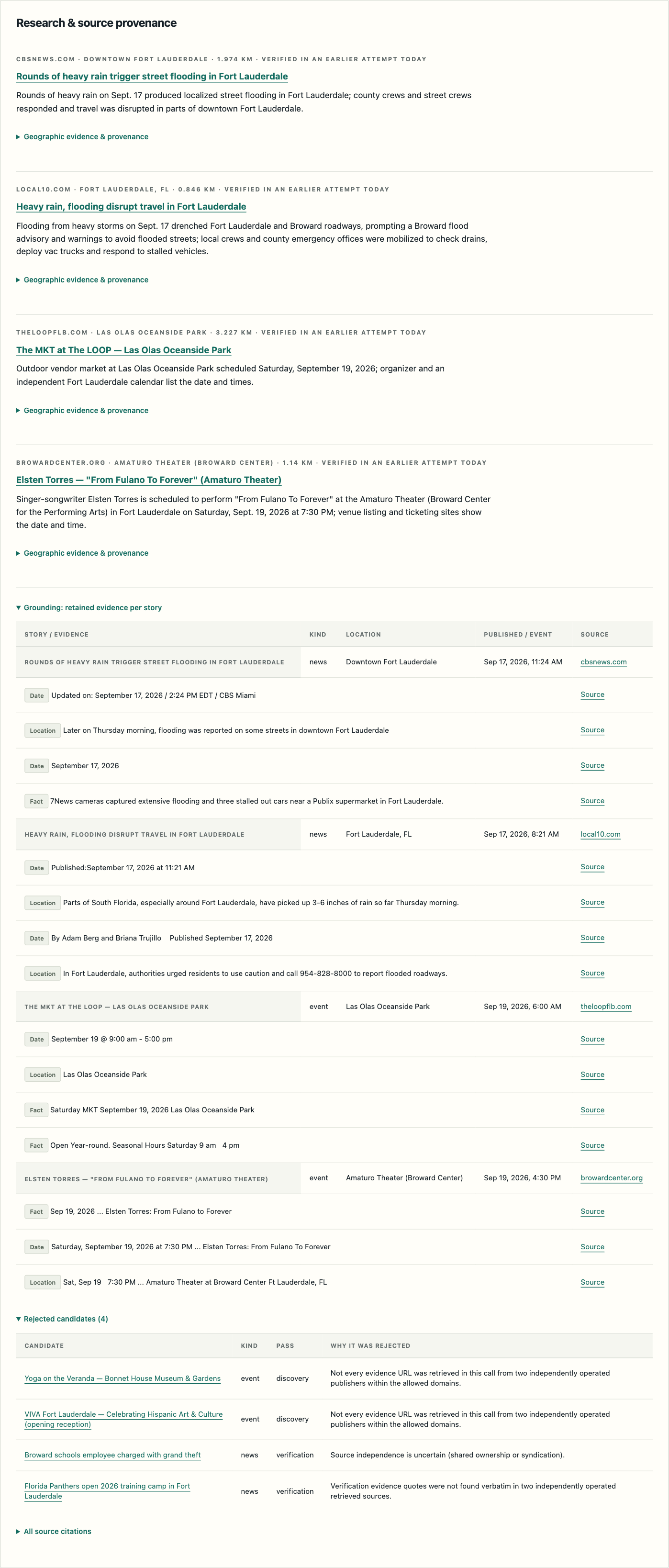
A brand preset holds the brand name, persistent screen text, font, narration voice and visuals. The preview card shows the treatment before the first run, and scheduled jobs reference a preset by version.
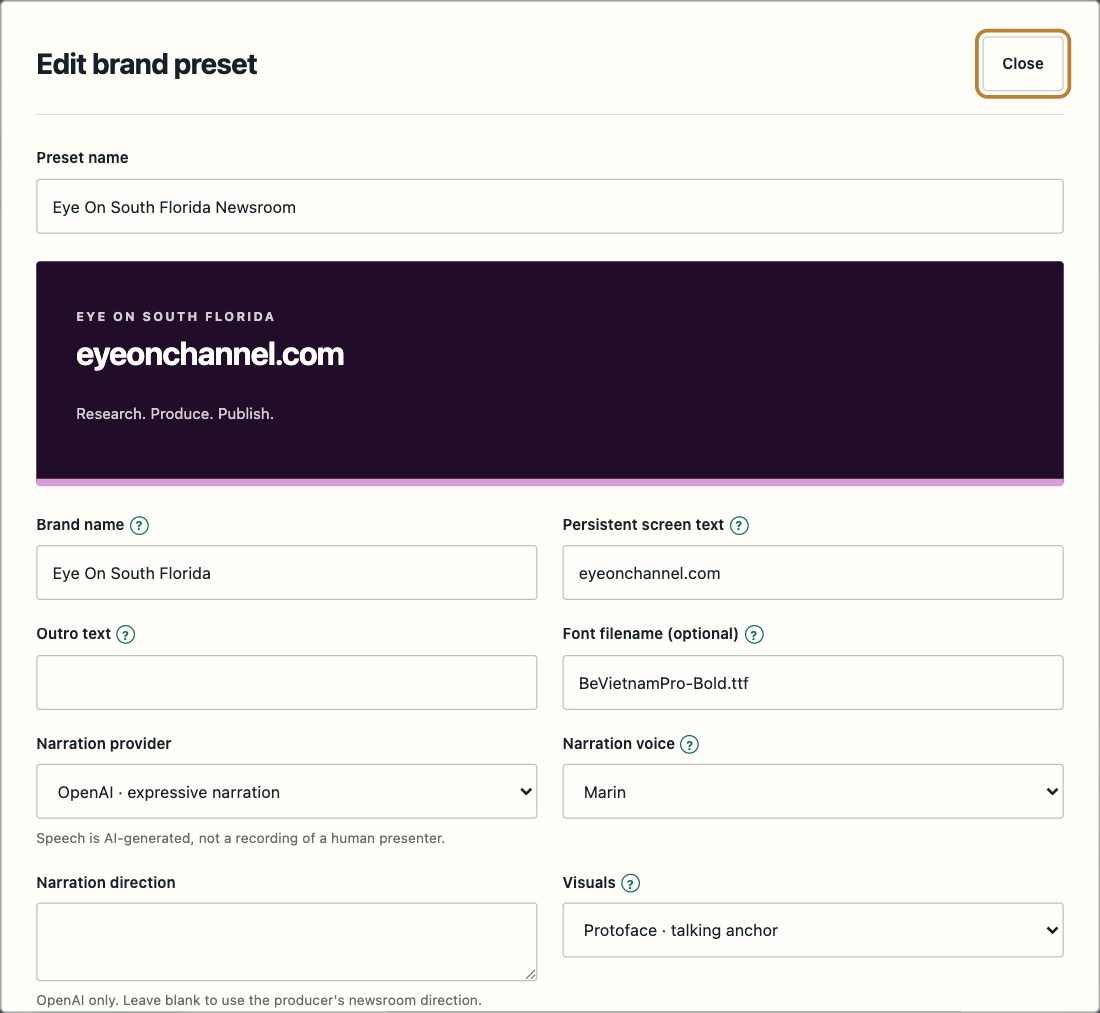
The job editor asks for a brand preset, a daily local time and timezone, then a geographic brief: city, coordinates, coverage radius and look-back window. Every field carries its own help note, so nobody guesses what a radius or a look-back does.
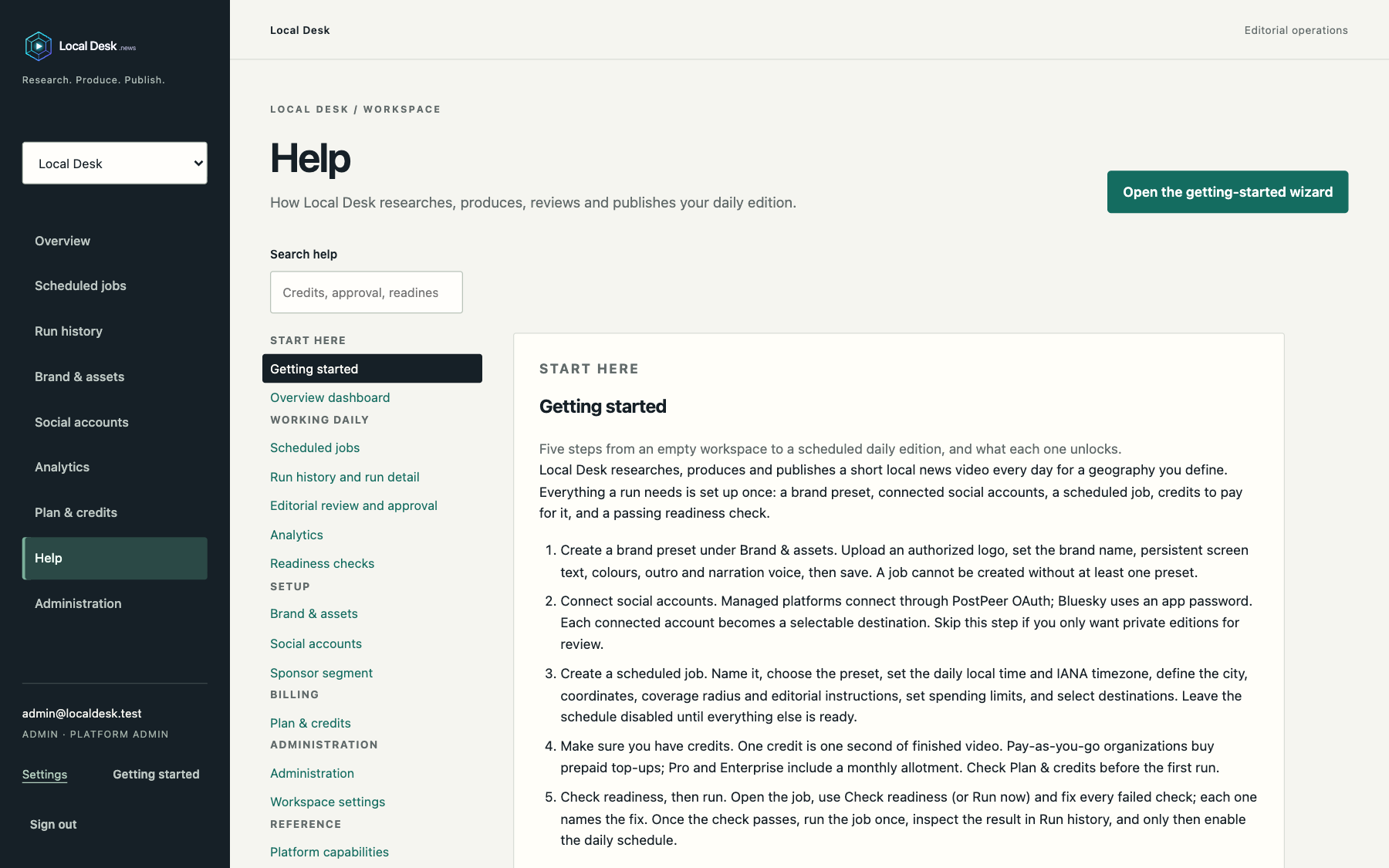
Searchable help covers every page of the desk, from readiness checks to sponsor segments. The getting-started guide walks through creating a brand preset, connecting accounts, scheduling a job, adding credits and checking readiness before the first run.
Why you need it
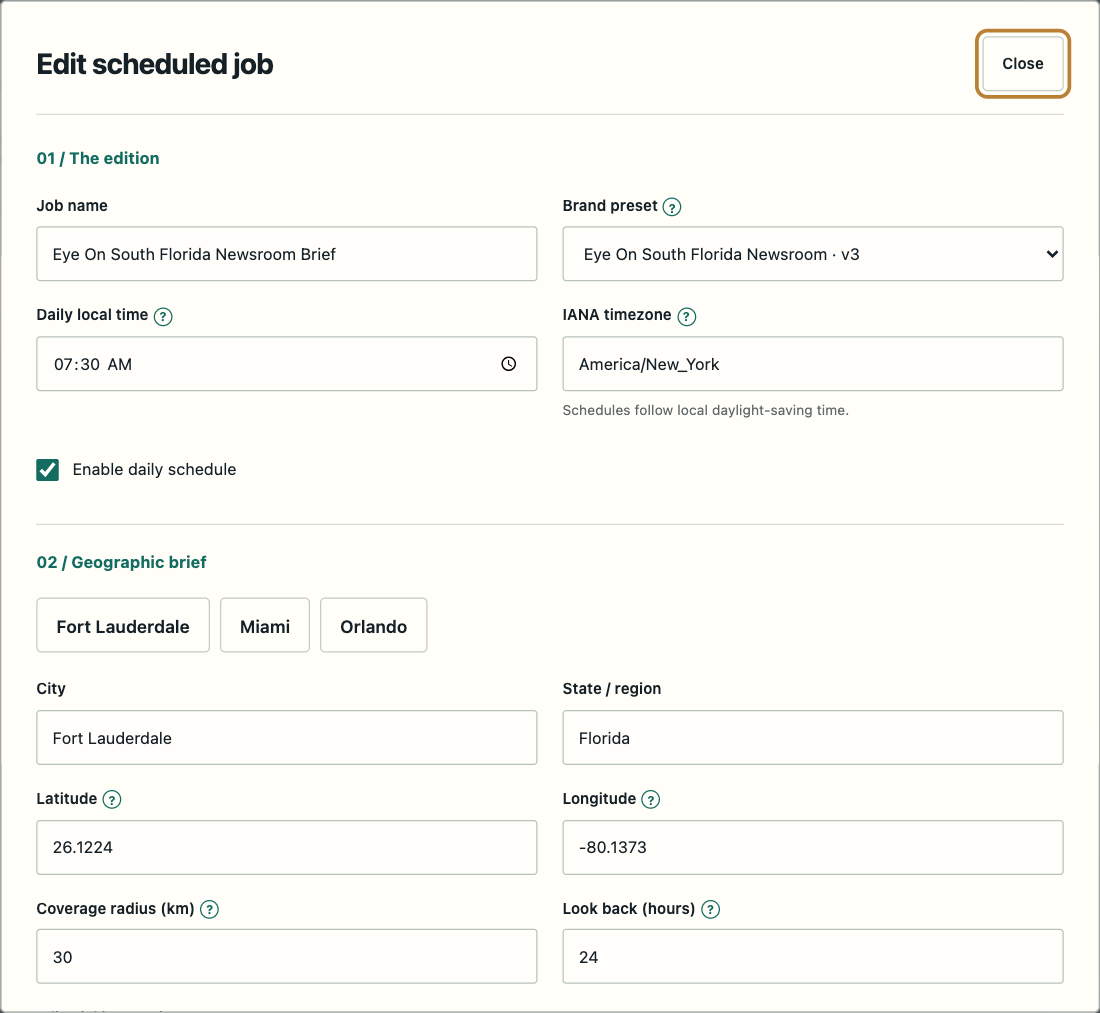
Schedule an edition per day, per desk. Research, script, production, captions and per-platform posting happen on time whether or not anyone is at a keyboard.
Sources on a public page, verification before production, and clear AI disclosure. Your audience sees where each story came from.
On paid plans, add a sponsor card at the opening, closing or both, with the sponsor's logo, name and tagline and a visible "Sponsored" badge. Sell it like a broadcast spot.
Compare
| Capability | Local Desk | Generic AI video toolsPictory / InVideo / Lumen5 | AI avatar toolsSynthesia / HeyGen | Clipping & editingOpusClip / Descript | Newsroom video automationWochit | DIY producer |
|---|---|---|---|---|---|---|
| Sourced local research with retained citations | ✓ | — | — | — | —licensed agency footage; no citations | manual |
| Independent date/place verification | ✓facts, dates, local relevance | unclear | unclear | unclear | unclear | manual |
| Editorial approve/reject bound to copy | ✓ | ◐Lumen5 Team plan approval; Pictory / InVideo unclear | unclearHeyGen Business: draft commenting | unclear | unclear | manual |
| Final-file QA (ASR + frames) | ✓ | unclear | unclear | unclear | unclear | manual |
| Multi-platform publishing with per-target copy | ✓ | unclearPictory resizes per platform | unclear | ◐OpusClip posts to Shorts / TikTok / Instagram; Descript drafts post text | unclearOVP / CMS push on Enterprise | manual |
| Public source page per edition | ✓ | — | — | — | — | manual |
| AI presenter with disclosure | ✓fictional presenter, disclosed on screen | ◐Pictory avatars; disclosure not stated; InVideo / Lumen5 unclear | ◐avatars ✓; disclosure not stated | ◐Descript avatars; OpusClip none | unclear | — |
| Word-timed captions + VTT/SRT | ✓ | ◐Pictory SRT/VTT export, Lumen5 auto captions; InVideo unclear | ◐Synthesia closed captions; HeyGen unclear | ✓ | unclear | manual |
| Cost per 60-second edition | $9.00 pay as you go$5.40 Pro · $4.50 Enterprise (additional-credit rate); presenter editions 2× credits | $19–$199/mo minute poolsPictory $29–$199/mo · InVideo $20–$101/seat/mo annual · Lumen5 $19–$149/mo annual; not priced per edition | $29–$149/mo credit poolsSynthesia $29–$89/mo · HeyGen $29–$149/mo | $15–$65/moOpusClip $15–$29/mo · Descript $24–$65/person/mo | $1,499/moStudio Basic, 3 seats; ≈ $50 per edition at 30/mo | ≈ $902.5 h × $36.10/h |
| Sponsor segments | ✓Pro, Enterprise and Custom | unclear | unclear | unclear | unclear | manual |
Compiled from each vendor's public pricing/product pages on 2026-09-17; capabilities not stated on those pages are marked unclear. Prices may change. Sources: Pictory, InVideo, Lumen5, Synthesia, HeyGen, OpusClip, Descript, Wochit, BLS Occupational Outlook, film and video editors and camera operators (May 2025 median $36.10/h). Vendor plan prices shown are the monthly figures printed on those pages, some of which are billed annually; DIY figure is wage only.
Cost savings
| Option | Per edition | Per month (30 editions) | Basis |
|---|---|---|---|
| DIY producer | ≈ $90 | ≈ $2,700 | About 2.5 hours per edition (research, script, record, edit, caption, post) at $36.10/h, the BLS May 2025 median hourly wage for film and video editors and camera operators. Wage only; excludes benefits, software, stock media and music. |
| Newsroom automation (Wochit) | ≈ $50 | $1,499 | Wochit Studio Basic, $1,499/mo billed monthly as printed 2026-09-17 (3 seats). Excludes staff time to research, write and operate. |
| Local Desk — Pay as you go | $9.00 | ≈ $270 | 60 credits × $0.15. No monthly fee. |
| Local Desk — Pro | $4.97 | $149 | $149/mo includes 1,800 credits, exactly 30 sixty-second editions; extra editions cost 60 × $0.09 = $5.40. |
| Local Desk — Enterprise | $4.99 | $499 | $499/mo includes 6,000 credits, which covers 100 editions (three daily desks); extra editions cost 60 × $0.075 = $4.50. At 30 editions the month fits inside the included credits. |
Assumptions: one desk, one 60-second edition per day, no sponsor segment (sponsor seconds count as credits), Local Desk list prices, and DIY time as stated. A run that fails before production is not charged. Your own numbers will differ.
Pricing
A 60-second edition is 60 credits; sponsor segment seconds count too. Included credits do not roll over and renew when your subscription payment clears. Purchased additional credits persist while your account is active. No refunds, cancel anytime, no contract.
60-second edition ≈ $9.00
Covers one daily 60-second edition · extra editions $5.40
Covers three daily desks (100 editions) · extra editions $4.50
Tell us about your operation
Request a custom packageSubscriptions bill through Stripe. After you sign up and set your password, choose Pro or Enterprise from the Billing page; you start on Pay as you go until the first subscription payment clears. Prices in USD, taxes may apply.
Custom Packages
Tell us what you publish and where. A member of our business development team will reach out with a custom quote. Custom packages start at $5,000 per month.
FAQ
One credit is one second of finished video. A 60-second edition costs 60 credits. If you enable a sponsor segment, its seconds count too. A run that fails before production is not charged.
No. Pro and Enterprise include a fixed number of credits per billing period. Whatever is unused expires when the period ends. Additional credits you purchase persist while your account is active.
When your subscription payment clears in Stripe. If a payment fails, the plan is marked past due until it succeeds.
No. Subscription fees and purchased credits are not refundable.
Yes, anytime, from the Billing page through the Stripe customer portal. Cancellation takes effect at the end of the current billing period. There is no contract.
Narration is AI-generated and the presenter, when used, is a fictional AI avatar. Both are disclosed on screen in the video and on the public edition page. You remain the publisher and are responsible for meeting each platform's disclosure rules.
From hosted web search over your city and region. Each story keeps its native citations and is independently checked for facts, dates and local relevance within your configured geography and source restrictions. Its sources are listed on the edition's public page; two publishers per story are not required.
You do, to accounts you connect. Local Desk produces the edition and posts it to your connected platforms with per-platform copy once you approve it.